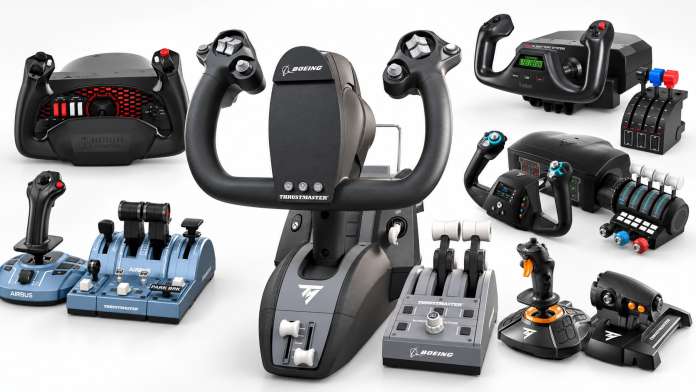
Finding the best flight simulator controls for Microsoft Flight Simulator 2024 comes down to more than buying the most expensive yoke or throttle quadrant on the market. With several manufacturers offering increasingly sophisticated hardware, choosing the right setup depends on what you fly, how much space you have, and whether the additional features justify the investment. Some premium equipment looks impressive on paper but doesn’t necessarily deliver a better experience once it’s sitting on your desk.
We’ve experienced that firsthand at Elite Ace Aviation. We own the Thrustmaster TCA Boeing Yoke Pack, Honeycomb Alpha Flight Controls, and Honeycomb Bravo Throttle Quadrant, giving us some perspective on how these products compare beyond their advertised features. While there are things we appreciate about all three, we’ve also encountered some frustrations that prospective buyers should understand before spending several hundred dollars.
For this guide, we’ve combined our ownership experience with manufacturer specifications, independent reviews, and feedback from the flight simulation community. The result is seven products worth considering, whether you’re building your first home cockpit or upgrading an existing MSFS 2024 setup.
Disclosure: Elite Ace Aviation may earn a commission from qualifying purchases made through affiliate links in this article, at no additional cost to you. Our product assessments and recommendations are editorially independent.
Best Flight Simulator Controls: Quick Comparison
| Product | Best For | Platform |
|---|---|---|
| Thrustmaster TCA Boeing Yoke Pack | Best Overall | PC / Xbox |
| Honeycomb Alpha Flight Controls | Best Traditional GA Yoke | PC* |
| Logitech G Saitek Pro Flight Yoke System | Best Budget Yoke | PC |
| Thrustmaster TCA Captain Pack X | Best Airbus Controls | PC / Xbox |
| Turtle Beach VelocityOne Flight | Best All-in-One System | PC / Xbox |
| Honeycomb Bravo Throttle Quadrant | Best Standalone Throttle | PC* |
| Thrustmaster T.16000M FCS HOTAS | Best Affordable HOTAS | PC |
Compatibility refers to the standard products discussed. Honeycomb offers additional Xbox-compatible hardware configurations.
1. Thrustmaster TCA Boeing Yoke Pack: Best Overall
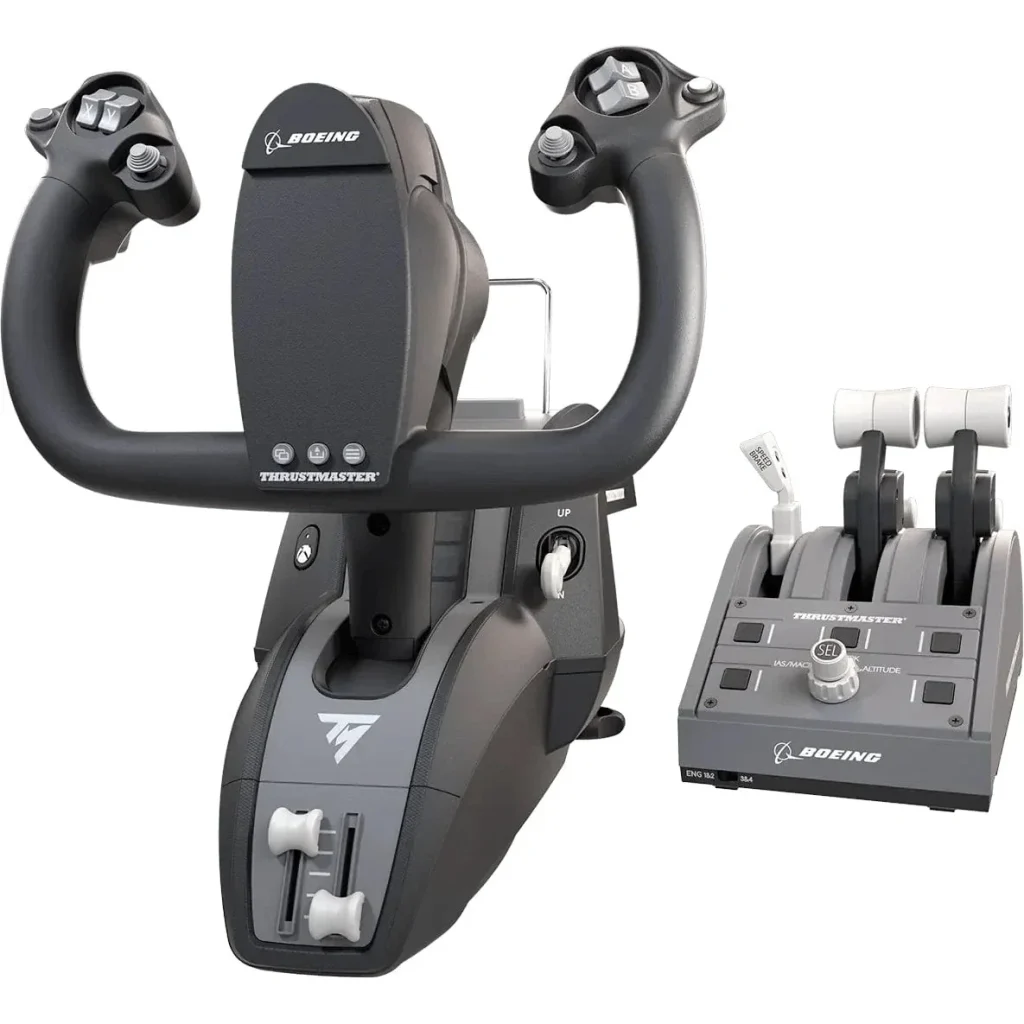
The Thrustmaster TCA Boeing Yoke Pack earns our top position for its combination of engineering, functionality, and overall flying experience. Officially licensed by Boeing, the system takes inspiration from the 787 Dreamliner and includes a Boeing-style yoke alongside a matching throttle quadrant. It’s a substantial package that provides much of what someone needs to get started with a more realistic home simulator without immediately purchasing several separate components.
What separates the Thrustmaster from conventional flight simulator yokes is its suspended PENDUL_R mechanism. Rather than sliding along a traditional shaft, the yoke moves through a pendular arrangement intended to reproduce the motion of Boeing’s floor-mounted control column. The system also incorporates a metal internal frame, adjustable spring resistance, and magnetic technology for measuring control inputs.
The included throttle quadrant features interchangeable levers and additional controls for managing functions such as altitude, heading, and airspeed. Having those controls physically accessible makes a noticeable difference to the way a simulator cockpit can be operated, particularly when flying commercial aircraft. Users can also expand the arrangement with additional compatible Thrustmaster hardware.
Our Experience With the Thrustmaster Boeing Yoke
We own this system at Elite Ace Aviation, and it has given us very little to complain about. We haven’t experienced any meaningful problems with our Thrustmaster setup, which is worth mentioning considering we’ve also owned competing Honeycomb equipment. While Honeycomb often receives considerable attention among serious flight simulator enthusiasts, our experience hasn’t convinced us that it’s automatically the superior purchase.
That doesn’t mean the Thrustmaster is without potential drawbacks. Its mounting assembly is fairly large, and some owners have noted that the forward-projecting design can interfere with seating arrangements, particularly on smaller computer desks. The pendular movement is also distinctly Boeing-inspired, so someone primarily interested in replicating a conventional Cessna cockpit may prefer a more traditional yoke.
Even with those considerations, the overall package makes a compelling case for itself. Between the included throttle, distinctive control mechanism, construction, and our own positive ownership experience, the Thrustmaster is the system we’d place first in this guide.
What we like: Boeing-inspired pendular mechanism, included throttle quadrant, adjustable resistance, substantial construction, and PC/Xbox compatibility.
What to consider: Large mounting assembly, premium pricing, and a control movement designed around Boeing aircraft rather than conventional general aviation yokes.
Compatibility: Windows PC, Xbox One, and Xbox Series X|S.
View the Thrustmaster TCA Boeing Yoke Pack at Pilot Mall
2. Honeycomb Alpha Flight Controls: Best Traditional General Aviation Yoke
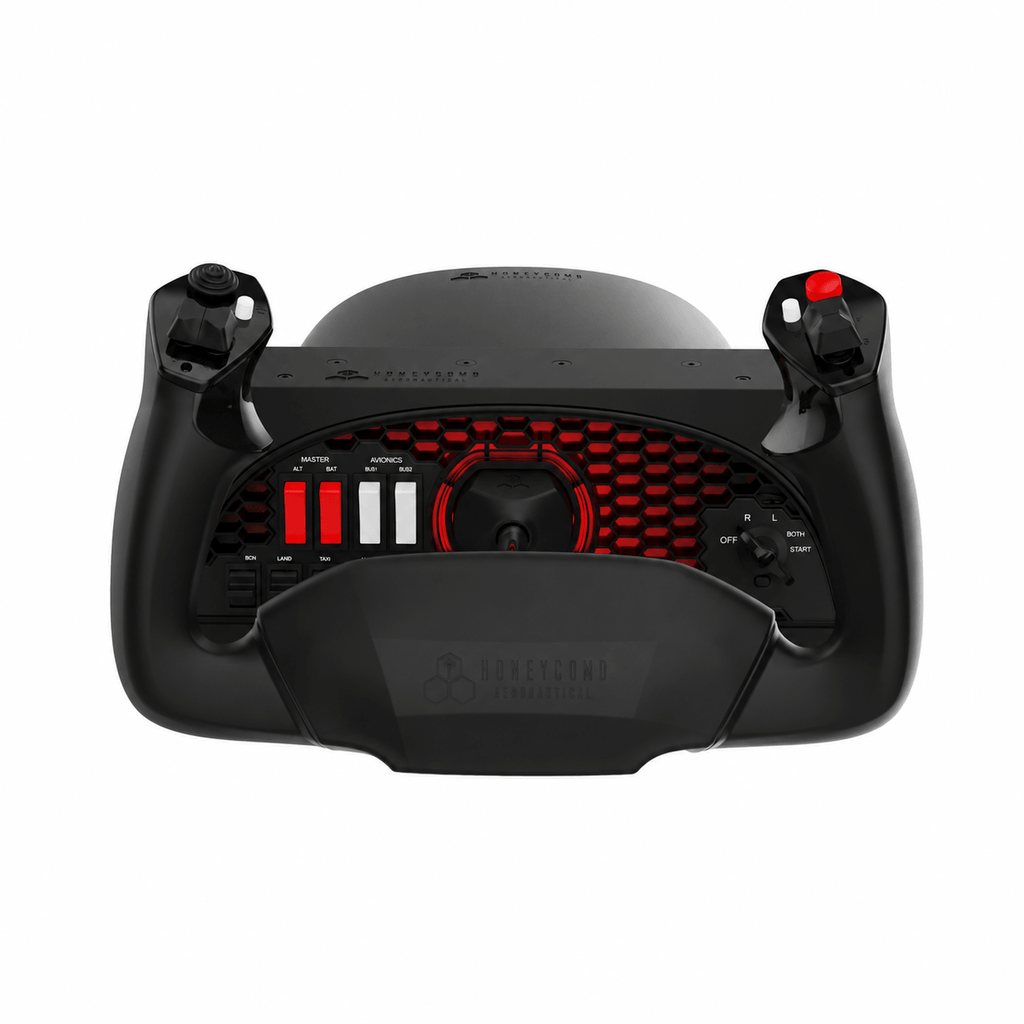
Honeycomb’s Alpha Flight Controls have developed a strong reputation among home simulator enthusiasts, particularly those interested in general aviation. The Alpha uses a conventional yoke arrangement with 180 degrees of rotation, integrated switches, programmable controls, and a design that lends itself to aircraft such as the Cessna 172 and Piper PA-28. It also offers a more traditional control layout than the Thrustmaster Boeing system.
The Alpha includes a switch panel for commonly used aircraft functions, allowing pilots to operate certain cockpit controls without constantly reaching for a mouse. Paired with the Bravo Throttle Quadrant, it can form the foundation of a fairly elaborate desktop simulator. The equipment looks and feels more substantial than many entry-level alternatives, although the complete setup also comes at a considerably higher price.
Our Experience With Honeycomb Alpha
We own Honeycomb controls, and while there are several things to appreciate about the Alpha, our experience hasn’t been entirely positive. One issue we’ve encountered involves keeping the controls securely positioned on the desk, even with the locking mechanism engaged. It’s frustrating to experience that with equipment positioned in the premium end of the market, particularly when a stable mounting arrangement is such an important part of operating a flight simulator.
We’re not suggesting every Honeycomb owner will encounter the same issue. Mounting performance can vary depending on desk thickness, surface material, and the particular arrangement being used, but it’s a drawback we’ve experienced firsthand. Combined with the price of the Alpha and the additional expense of purchasing a throttle quadrant, it’s enough to make us question whether the system represents a meaningful upgrade over the Thrustmaster.
There is also some company history buyers may want to understand. Honeycomb went through a widely publicized management and ownership dispute during 2023 and 2024, creating uncertainty around its operations and product availability. The company subsequently continued selling flight simulation equipment under new management, so the suggestion that all Honeycomb hardware has been permanently discontinued is inaccurate.
For someone building a dedicated general aviation cockpit, the Alpha remains a serious contender. Its traditional configuration and integrated switch panel make sense for that application, but we wouldn’t purchase it solely on reputation. Consider the mounting arrangement, total system cost, and the aircraft you actually fly before committing.
What we like: Traditional yoke configuration, 180-degree rotation, integrated cockpit switches, and flexibility for general aviation simulation.
What to consider: Premium pricing, separate throttle purchase, and the desk-mounting frustrations we’ve personally experienced.
Compatibility: Windows PC for the original Alpha. Honeycomb’s Alpha XPC is a separate model with additional Xbox compatibility options.
View Honeycomb Alpha Flight Controls
3. Logitech G Saitek Pro Flight Yoke System: Best Budget Yoke
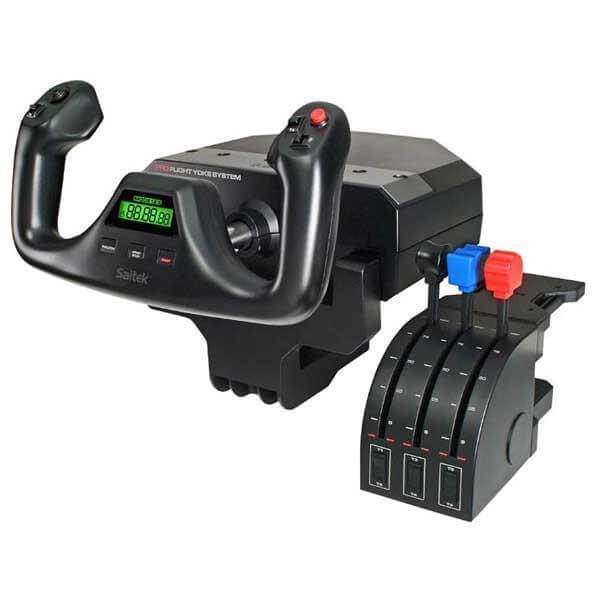
Not everyone needs to spend several hundred dollars to enjoy Microsoft Flight Simulator 2024. The Logitech G Saitek Pro Flight Yoke System remains an accessible option for someone moving beyond a keyboard, mouse, or basic joystick. It includes a conventional yoke and a separate three-lever throttle quadrant, providing a reasonably complete starting point for general aviation flying.
The included throttle quadrant can be configured for throttle, propeller pitch, and mixture, or reassigned for other aircraft configurations. Programmable buttons, a built-in display, and additional control options help reduce reliance on keyboard shortcuts during flight. For a beginner experimenting with a home cockpit, having both primary flight controls and engine controls in one package is particularly convenient.
The compromise comes from the older hardware design. The Saitek yoke offers approximately 90 degrees of total rotation, considerably less than the 180-degree movement available on the Honeycomb Alpha or Thrustmaster Boeing yoke. Community reviews have also noted that the control movement isn’t as refined as more expensive alternatives, particularly when making smaller inputs around the center position.
Those limitations are easier to accept when considering its place in the market. Someone just getting started may be better served by purchasing an affordable, functional setup and determining what they enjoy flying before investing in premium equipment. The Logitech provides that opportunity without requiring an elaborate collection of hardware from day one.
What we like: Accessible pricing, included throttle quadrant, programmable controls, and straightforward general aviation functionality.
What to consider: Older design, more limited yoke rotation, and less refined control movement than premium alternatives.
Compatibility: Windows PC.
Shop Logitech Flight Simulator Controls at Pilot Mall
4. Thrustmaster TCA Captain Pack X Airbus Edition: Best for Airbus Flying
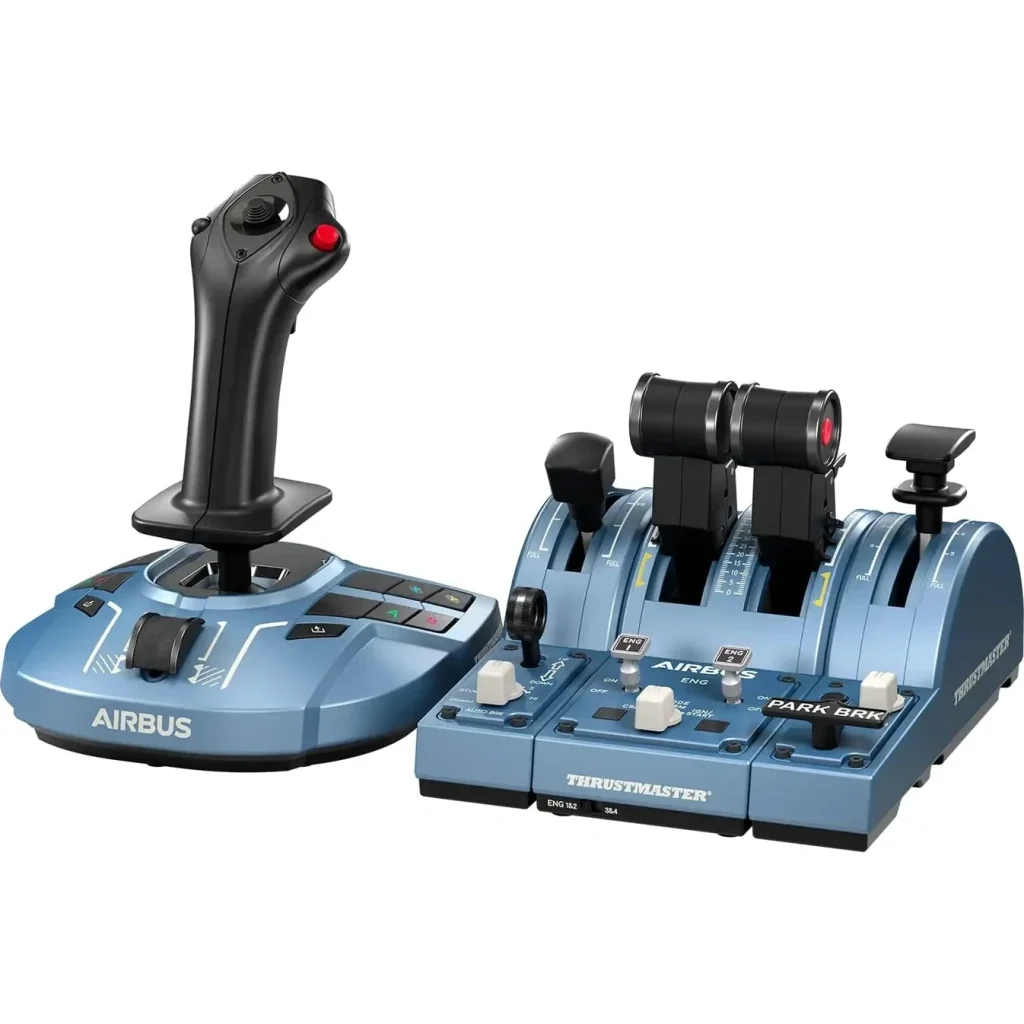
Pilots who spend most of their time flying the Airbus A320 family have different hardware requirements from someone building a traditional general aviation cockpit. Airbus uses a sidestick rather than a conventional yoke, and the Thrustmaster TCA Captain Pack X is designed around that arrangement. It’s an officially licensed Airbus-inspired system combining a sidestick, throttle quadrant, and additional control modules.
One of its biggest advantages is the throttle configuration, which incorporates features intended to reproduce the distinctive Airbus control layout. Configurable thrust-reverser functions, engine-related controls, and additional modules for flaps and speed brakes provide a more representative arrangement than a generic throttle system. The sidestick also offers programmable controls and interchangeable components to accommodate different configurations.
This can be especially appealing when flying detailed Airbus add-ons that reproduce the aircraft’s flight management and automation systems. Having physical controls that correspond more closely to those in the simulated cockpit makes certain procedures easier to manage without relying entirely on mouse inputs. The Captain Pack X also supports both PC and compatible Xbox systems.
Its specialization is both the primary advantage and the main limitation. Someone flying Airbus aircraft almost exclusively may appreciate the dedicated arrangement, while a pilot frequently switching between Cessnas, Boeing airliners, and business jets may find a more conventional system easier to adapt. Buyers should also confirm they’re purchasing the Captain Pack X rather than an earlier version if Xbox compatibility is important.
What we like: Airbus-inspired control layout, included throttle and additional modules, configurable sidestick, and PC/Xbox support.
What to consider: Specialized design, additional desk space requirements, and less flexibility for certain non-Airbus aircraft.
Compatibility: Windows PC and Xbox Series X|S.
View the Thrustmaster TCA Captain Pack X at Pilot Mall
5. Turtle Beach VelocityOne Flight: Best All-in-One System
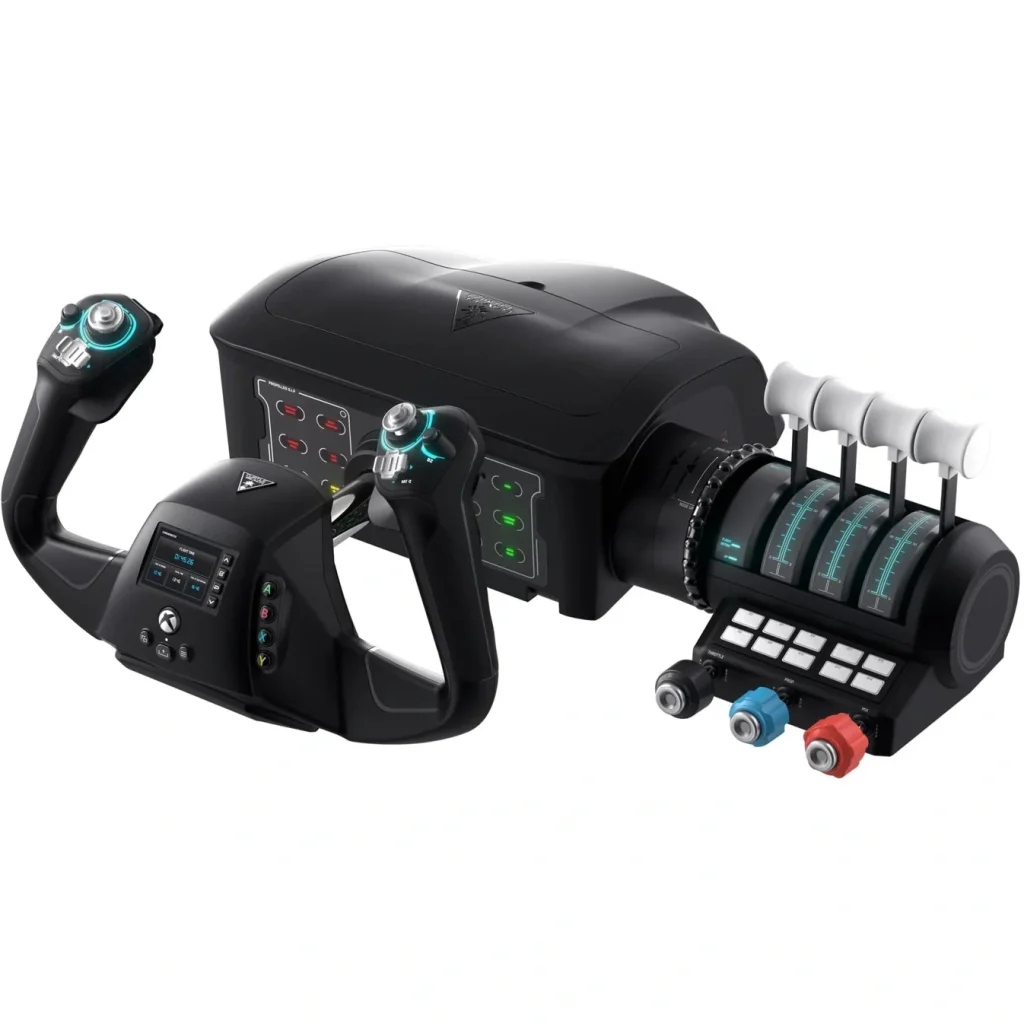
The Turtle Beach VelocityOne Flight takes a different approach from systems that require users to purchase their yoke, throttle, and additional cockpit controls separately. It combines several essential functions into one integrated unit, making it particularly appealing to someone who wants a capable home simulator without assembling equipment from multiple manufacturers. The package includes a yoke, configurable throttle quadrant, trim wheel, and additional controls.
Its yoke provides 180 degrees of rotation, while the modular throttle arrangement allows users to change lever configurations depending on the aircraft being flown. A built-in Flight Management Display provides access to settings and configuration information, and the system includes integrated rudder-control functionality for users who haven’t purchased dedicated pedals. The VelocityOne supports PC and compatible Xbox systems, giving it a broader audience than many traditional simulator peripherals.
There are practical advantages to this arrangement, especially for someone who wants an integrated setup with fewer separate components. However, the VelocityOne has received mixed feedback from owners, including reports involving configuration difficulties, software-related issues, and dissatisfaction with certain aspects of the control feel. These experiences aren’t universal, but they’re worth considering alongside the features advertised by Turtle Beach.
The integrated design also means buyers have less freedom to select individual components compared with a modular system. Its fairly substantial desktop footprint is another consideration, particularly if the simulator shares space with a regular computer setup. Nevertheless, the VelocityOne offers a useful combination of controls for someone who values convenience and Xbox compatibility.
What we like: Integrated yoke and throttle system, built-in trim wheel, configurable levers, 180-degree rotation, and Xbox compatibility.
What to consider: Mixed owner feedback, sizeable mounting footprint, and fewer opportunities to select individual control components.
Compatibility: Windows PC, Xbox One, and Xbox Series X|S.
View Turtle Beach VelocityOne Flight at Pilot Mall
Retail availability may vary.
6. Honeycomb Bravo Throttle Quadrant: Best Standalone Throttle
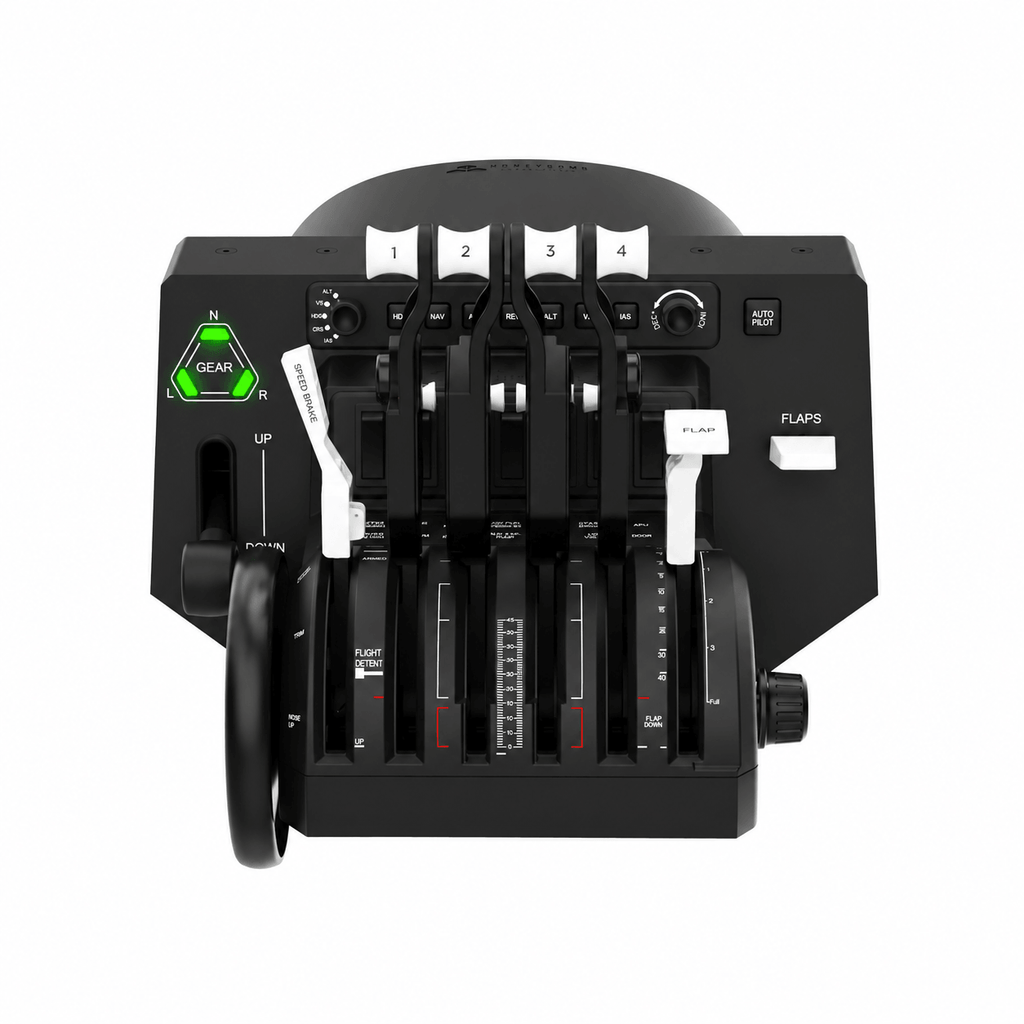
The Honeycomb Bravo Throttle Quadrant is one of the more versatile standalone throttle systems available for home flight simulation. Rather than limiting buyers to a fixed engine configuration, it features six configurable lever positions and interchangeable handles, allowing the hardware to accommodate different types of aircraft. It also incorporates an autopilot control panel, trim wheel, annunciator lights, and additional cockpit switches.
That flexibility is particularly useful in MSFS 2024, where someone might fly a single-engine piston aircraft one evening and a twin-engine business jet the next. Being able to configure different throttle arrangements without purchasing a completely separate quadrant makes the Bravo an attractive option for pilots who enjoy multiple aircraft categories. It can also be paired with compatible controls from other manufacturers, so owning a Honeycomb Alpha isn’t a requirement.
Our Experience With the Honeycomb Bravo
We also own the Bravo Throttle Quadrant at Elite Ace Aviation, and our experience with it has generally been better than with the Alpha when it comes to physical and mounting-related issues. We haven’t encountered the same level of frustration with that aspect of the Bravo, although it hasn’t been entirely trouble-free. Our main complaints have involved the LED lighting and occasional difficulties with control mapping, both of which can become frustrating when setting up different aircraft.
Interestingly, similar issues have appeared in Microsoft Flight Simulator community discussions, particularly following the release of MSFS 2024. Other owners have reported annunciator lights not functioning correctly, controls requiring additional configuration, and unexpected behavior with certain assignments. Some lighting problems have involved the software bridge used to communicate simulator information to the hardware, meaning they shouldn’t automatically be interpreted as physical defects in the Bravo itself.
For us, the distinction is important. We’ve encountered fewer physical frustrations with the Bravo than with our Honeycomb Alpha, but the lighting and mapping experience hasn’t always been as straightforward as we’d like. Buyers should understand that taking full advantage of its features may require some additional configuration, especially when moving between aircraft with different systems.
Despite those complaints, the Bravo remains a compelling standalone throttle because of its versatility. Someone building a simulator around several different aircraft types may find its interchangeable lever system more practical than purchasing a throttle quadrant designed exclusively for one manufacturer. Just factor in the price, required desk space, and the possibility of additional software configuration.
What we like: Six configurable lever positions, interchangeable handles, integrated autopilot controls, trim wheel, and flexibility across different aircraft categories.
What to consider: Premium purchase price, substantial desktop footprint, and the LED lighting and control-mapping frustrations we’ve personally experienced.
Compatibility: Windows PC for the standard Bravo. Other platform configurations require appropriate supporting hardware.
View the Honeycomb Bravo Throttle Quadrant
7. Thrustmaster T.16000M FCS HOTAS: Best Affordable HOTAS
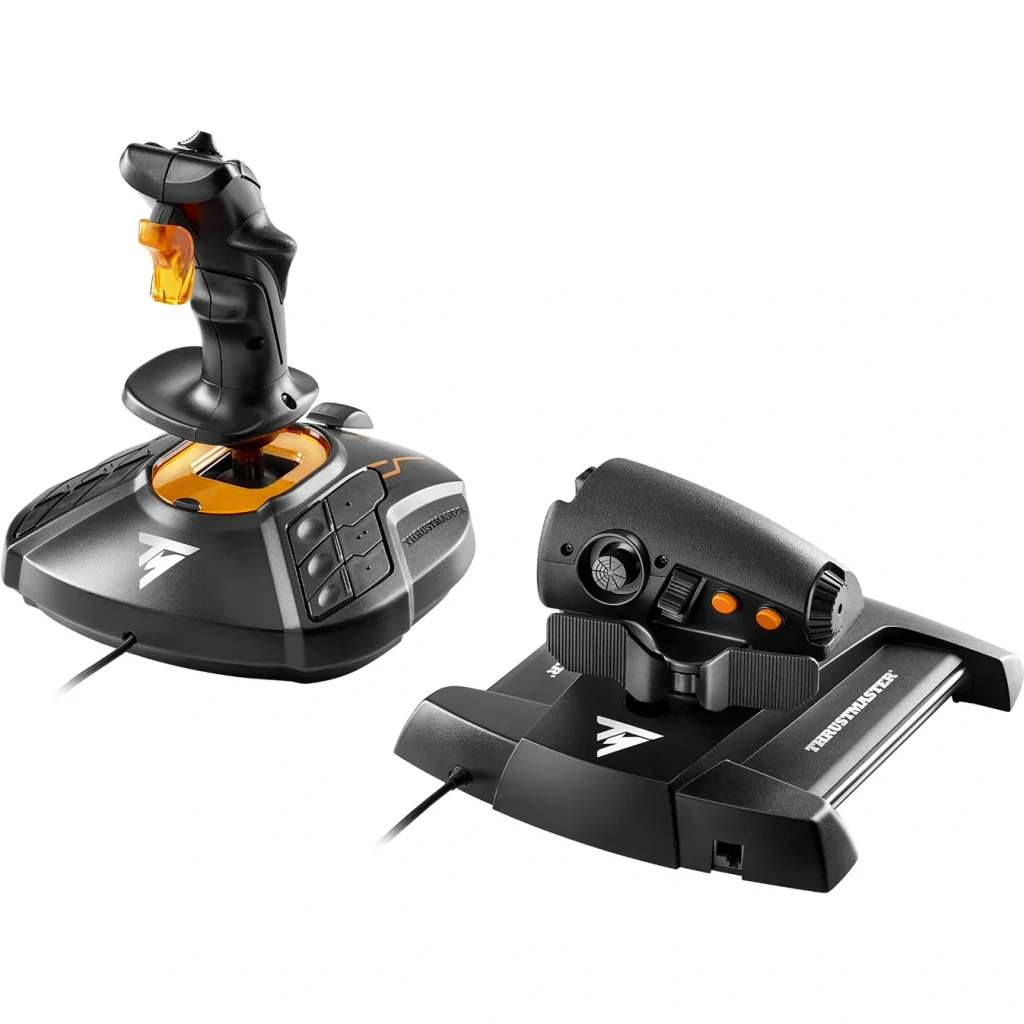
Not every aircraft in Microsoft Flight Simulator 2024 uses a traditional yoke, and some pilots may prefer a joystick-based setup for its versatility and smaller footprint. The Thrustmaster T.16000M FCS HOTAS combines a separate flight stick and throttle, providing a practical alternative for someone interested in military aircraft, helicopters, and other stick-controlled aircraft. It also offers a comparatively accessible entry point into dedicated HOTAS equipment.
The T.16000M joystick uses Thrustmaster’s H.E.A.R.T magnetic sensing technology for its primary pitch and roll axes, while the accompanying TWCS throttle incorporates a sliding mechanism and additional programmable controls. The joystick also features a twist-axis rudder function, allowing users to establish basic rudder control without immediately purchasing a separate pedal system. Both components can be configured to accommodate different aircraft and simulator functions.
One advantage of a HOTAS setup is having frequently used controls within reach of the throttle and stick. This becomes useful when flying aircraft that require regular adjustments without repeatedly moving a hand back to the keyboard or mouse. The T.16000M provides a substantial number of configurable inputs without reaching the price of more elaborate enthusiast-grade HOTAS systems.
There are compromises, particularly in the materials and overall construction compared with premium metal control systems. Its physical layout also won’t replicate the cockpit of a conventional Cessna or Boeing airliner, although it can still be configured to operate those aircraft within the simulator. For PC users wanting to explore stick-and-throttle flying without making a major investment, it remains an option worth examining.
What we like: Separate joystick and throttle, magnetic sensing on the primary stick axes, programmable controls, twist rudder, and accessible pricing.
What to consider: PC-only compatibility, more modest construction than premium HOTAS systems, and a configuration better suited to stick-controlled aircraft.
Compatibility: Windows PC.
View Thrustmaster T.16000M FCS HOTAS at Pilot Mall
Retail availability may vary.
Which Flight Simulator Controls Should You Buy for the Aircraft You Fly?
Choosing between these products becomes considerably easier once you consider the aircraft you spend most of your time flying. A control system designed around an Airbus cockpit won’t provide the same physical experience as a traditional general aviation yoke, even though both can be configured to operate many aircraft in MSFS 2024. Before purchasing, think about whether your simulator flying is primarily focused on general aviation, commercial airliners, business jets, or military aircraft.
| Aircraft Type | Controls to Consider |
|---|---|
| Cessna and Piper GA aircraft | Honeycomb Alpha or Logitech Saitek |
| Boeing airliners | Thrustmaster TCA Boeing |
| Airbus airliners | Thrustmaster TCA Captain Pack X |
| Business jets | Configurable yoke and throttle combination |
| Military aircraft | Thrustmaster T.16000M HOTAS |
| Mixed aircraft / Xbox | Turtle Beach VelocityOne |
| Multiple engine configurations | Honeycomb Bravo |
General Aviation
For aircraft such as the Cessna 172 and Piper PA-28, a conventional yoke generally provides a more representative arrangement. The Honeycomb Alpha and Logitech Saitek both follow that familiar layout, with the Honeycomb offering additional rotation and integrated switches. A separate throttle quadrant and rudder pedals can further improve the experience for pilots interested in practicing conventional general aviation procedures.
Boeing and Airbus
The choice becomes more specialized when moving into commercial airliners. Thrustmaster’s Boeing yoke reproduces the general movement of Boeing’s pendular control column, while the TCA Captain Pack X provides an Airbus-inspired sidestick and throttle arrangement. Neither is universally better for every aircraft, so your preferred simulator fleet should guide the purchase.
Business Jets
Business jet simulation presents an interesting challenge because cockpit configurations vary considerably between manufacturers and aircraft models. Some use conventional yokes, while others incorporate sidesticks and different throttle arrangements. If you regularly switch between aircraft such as the Citation CJ4 and newer fly-by-wire business jets, configurable hardware may prove more useful than equipment built around one particular cockpit.
Military Aircraft and Helicopters
For aircraft that use a control stick or cyclic-style arrangement, a traditional yoke generally isn’t the most representative choice. A joystick or HOTAS system provides a more appropriate starting point, particularly for military jets and aircraft requiring frequent access to multiple controls. Dedicated helicopter enthusiasts may eventually prefer purpose-built cyclic and collective equipment, although those products fall into a different category.
Do You Need Rudder Pedals for MSFS 2024?
Dedicated rudder pedals aren’t essential when first getting started with Microsoft Flight Simulator 2024, but they become increasingly valuable as you begin practicing more realistic aircraft handling. In general aviation, rudder inputs are important for coordinating turns, maintaining directional control, and handling crosswind takeoffs and landings. Physical pedals also make taxiing and differential braking more intuitive when the simulated aircraft supports those functions.
Some beginner control systems provide alternative rudder inputs through a joystick twist axis or integrated controls, allowing users to fly without purchasing additional hardware immediately. These arrangements are perfectly reasonable for someone learning the simulator or working with a limited budget. However, dedicated pedals are a worthwhile upgrade for anyone interested in developing a more conventional cockpit setup.
For a new home simulator, we’d generally prioritize the primary flight controls and throttle before investing in additional panels and accessories. Rudder pedals are a logical next addition, especially if you frequently fly general aviation aircraft or want more precise ground handling. They don’t have to be purchased at the same time as your first yoke or joystick.
Are Expensive Flight Simulator Controls Worth It?
There’s a noticeable difference between entry-level flight simulator hardware and more elaborate premium equipment, but price alone doesn’t determine how much you’ll enjoy flying. More expensive systems may offer improved sensing technology, additional controls, greater configurability, or more substantial construction. Those advantages matter most when they genuinely improve the way you use the simulator.
Our experience with Honeycomb and Thrustmaster is a good example of why we wouldn’t recommend making a purchase based entirely on brand reputation. We’ve been happy with our Thrustmaster Boeing controls, while our Honeycomb equipment has presented some frustrations despite its premium positioning. The Alpha’s mounting issues and the Bravo’s occasional LED and mapping problems are worth considering alongside their advertised features.
That doesn’t make Honeycomb a poor choice, nor does it mean every buyer needs the Thrustmaster. It simply reinforces the importance of considering ownership practicality, total system cost, and compatibility rather than assuming more expensive hardware automatically offers a better experience. A well-chosen midrange setup can be considerably more enjoyable than an elaborate cockpit filled with equipment you rarely use.
Final Thoughts
The best flight simulator controls aren’t necessarily the most expensive or the ones with the longest list of advertised features. They should suit the aircraft you fly, provide a practical setup for your available space, and offer enough flexibility to make your time in MSFS 2024 more enjoyable. Spending more only makes sense when those additional features translate into something you’ll actually use.
For Elite Ace Aviation, the Thrustmaster TCA Boeing Yoke Pack earns our top overall recommendation. We own it, haven’t experienced meaningful problems with our setup, and believe the combination of its distinctive control mechanism and included throttle makes it an attractive package. Honeycomb remains a legitimate alternative, particularly for traditional general aviation flying, although our ownership experience has shown that its premium reputation doesn’t make it immune to practical frustrations.
Those primarily flying Airbus aircraft have a more specialized option in the TCA Captain Pack X, while Logitech offers an accessible starting point for beginners. The VelocityOne provides an integrated alternative, the Bravo offers considerable throttle flexibility, and the T.16000M gives joystick enthusiasts a comparatively affordable HOTAS setup. Ultimately, choosing equipment that matches the way you actually fly will matter more than building the most expensive home cockpit possible.
FAQ
Our top overall pick is the Thrustmaster TCA Boeing Yoke Pack, thanks to its pendular control mechanism, included throttle quadrant, and our own positive ownership experience. However, the right setup depends on the aircraft you fly, your budget, and whether you’re using a PC or Xbox.
Not necessarily. We own equipment from both manufacturers and have had fewer issues with our Thrustmaster Boeing setup. While Honeycomb offers excellent flexibility for general aviation simulation, we’ve experienced some mounting frustrations with the Alpha and occasional lighting and control-mapping issues with the Bravo.
The Bravo is worth considering if you regularly fly different aircraft types. Its interchangeable levers and integrated autopilot controls make it particularly versatile, although we’ve experienced occasional LED lighting and mapping issues that required additional attention during configuration.
Yes. The Thrustmaster Boeing yoke can be configured to operate Cessnas and other general aviation aircraft in MSFS 2024. Although its pendular movement differs from a traditional Cessna-style yoke, you’re not limited to flying Boeing aircraft.
Not all of them. The Thrustmaster TCA Boeing Yoke Pack and Turtle Beach VelocityOne Flight support compatible Xbox and PC setups, while products such as the standard Logitech Saitek Yoke and Honeycomb Alpha are primarily designed for PC. Always verify the exact hardware version before purchasing.
More From Elite Ace Aviation
- MSFS 2024 Sim Update 6: Performance and Feature Improvements
- EmergencyDispatcherPro Has Landed for MSFS 2024
- Taog’s Hangar AS365 Dauphin for MSFS 2024